GH repo: https://github.com/0RuiAlvel0/desktoptie
I rely heavily on Windows virtual desktops to keep my work organized. Rather than treating them as occasional extra workspace, I use them as dedicated environments for different types of activity.
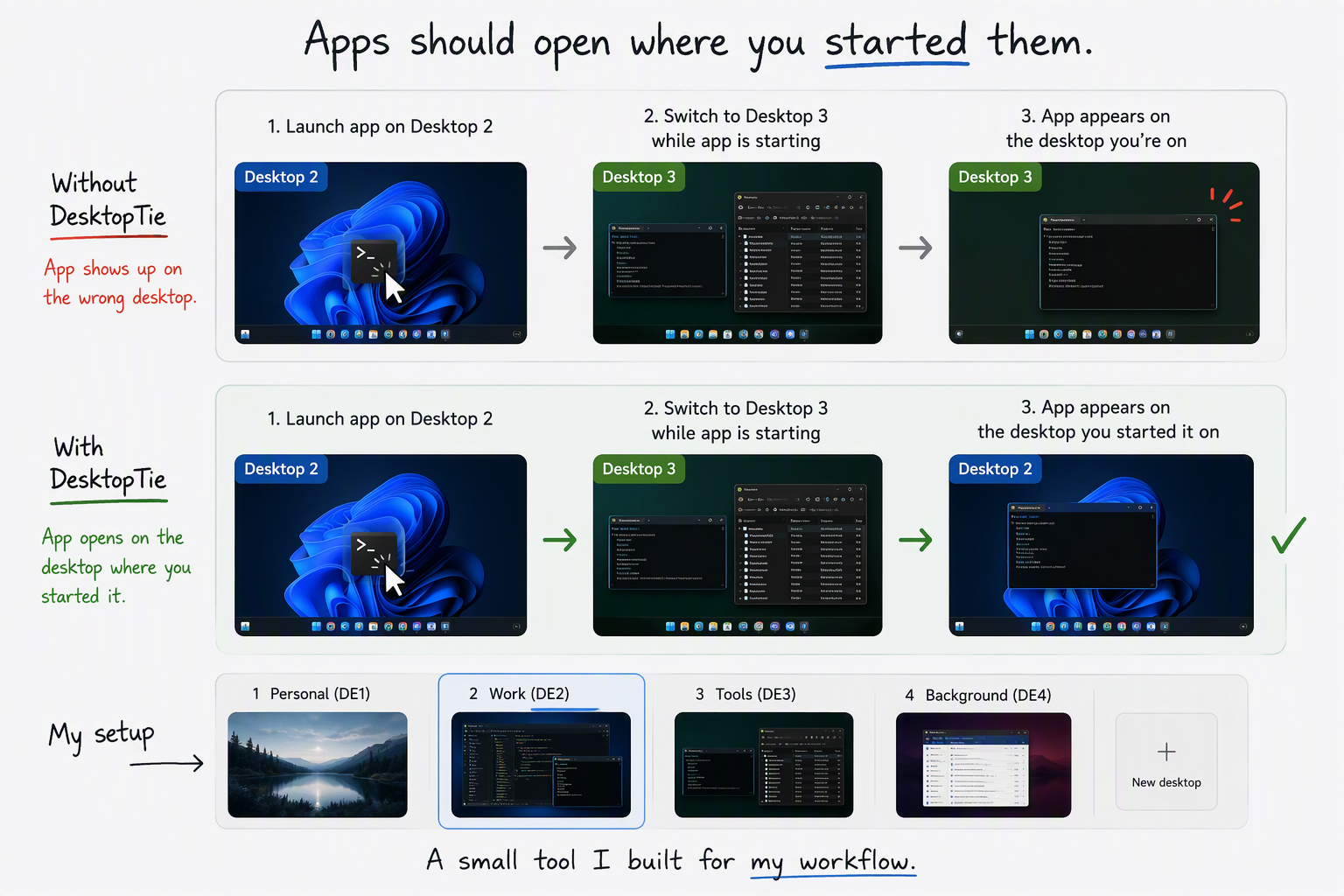
My setup usually looks something like this:
This structure helps me stay focused because different contexts remain separated. Instead of managing dozens of windows on a single desktop, I can move between workspaces that each have a clear purpose.
Because of this workflow, I switch between desktops constantly throughout the day.
The issue appears when launching applications.
Imagine I'm on Desktop 2 and start an application that takes a few seconds to load. While it's starting up, I move to Desktop 3 to check a log file or review a database query.
When the application finally opens, Windows places it on the desktop I'm currently viewing rather than the desktop where I started it.
From Windows' perspective this probably makes sense, but it doesn't match the way I work. The application was launched from Desktop 2, so that's where I expect it to appear.
After this happens enough times, the careful separation between desktops starts to break down. Applications end up scattered across workspaces, and I find myself wasting time moving windows back to where they belong.
My first assumption was that someone had already solved this problem. Virtual desktops have existed in Windows for years, and I couldn't imagine being the only person who found this behavior frustrating.
After quite a bit of searching, however, I couldn't find a tool that did exactly what I wanted.
That was a little surprising. It also made me wonder whether this is simply a very niche workflow. Perhaps most users don't switch desktops as frequently, or perhaps they have learned to live with the behavior.
Either way, I still wanted a fix.
Since I couldn't find a solution, I decided to create one.
The result is DesktopTie.
Its purpose is simple: when you launch an application, DesktopTie records the virtual desktop where that launch originated and ensures that the application's window appears on that same desktop, even if you have moved elsewhere before the application finishes loading.
The result feels much more natural. Applications open where they were launched, and the organization of my desktops remains intact throughout the day.
The interesting part of this project isn't just the utility itself. It's the fact that creating such a narrowly focused tool has become dramatically easier.
In the past, a project like this would probably have remained on my list of ideas for weeks. Not because it was especially difficult, but because getting from idea to working implementation takes time and effort.
This time I used GitHub Copilot Chat extensively during development.
That doesn't mean the application appeared fully formed after a single prompt. There was plenty of supervision involved, along with testing, verification, and course correction. In fact, that's exactly how I prefer to work.
What changed was the speed at which I could move from concept to implementation. Much of the routine development work that normally slows down a personal project became significantly easier, allowing me to focus on solving the actual problem rather than spending all my time on the mechanics.
For a small utility created to scratch a personal itch, that's a huge advantage.
DesktopTie solves a very specific problem. It may turn out that only a handful of people work with virtual desktops in the same way I do.
But that is one of the things I enjoy about modern software development. Projects no longer have to target a massive audience to justify their existence. If a tool makes one person's workflow better, that's often a good enough reason to build it.
If you happen to share this particular frustration with Windows virtual desktops, you can find the project on GitHub. The repository contains both the source code and an installer.
Install it, choose whether you want it to start automatically with Windows, and from that point onward applications will open on the virtual desktop where you launched them.
For my workflow, that's exactly the behavior I had wanted all along.